SQL server express management
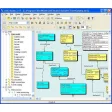
Microsoft SQL Server Management Studio Express (32-bit) provides a graphical environment for administering SQL Server 2005 Express Edition and related service components. It brings together interfaces for database creation, object navigation, script editing, and query execution. This free tool includes panels for viewing databases, stored procedures, user accounts, and service states.
Top Recommended Alternative

Microsoft SQL Server Management Studio Express (32-bit) also provides a query window for T-SQL operations and a structured layout for handling management objects within a unified framework. It's designed for database organization, script execution, and inspection of SQL Server components through a consolidated interface without extending into advanced enterprise tooling.
Mastering SSMSE
Microsoft SQL Server Management Studio Express (32-bit) includes an Object Explorer panel that presents databases, tables, views, and server-wide items in a hierarchical structure. The interface groups elements by type, allowing navigation across system objects and user-defined assets without requiring external utilities. It also incorporates context-specific menus that activate functions such as creating objects, viewing definitions, or modifying metadata through on-screen forms. However, it’s limited to the SQL Server 2005 feature set.
It features a T-SQL editor window that supports writing, opening, and executing scripts. The editor provides syntax highlighting, line numbering, and an output pane that displays results or messages from the server. You can run queries against selected database contexts and switch between them within the same environment. It also includes management options for saving scripts, viewing execution messages, and segmenting code into batches.
The software includes panels for server-level configuration, such as security roles, logins, endpoints, and surface-area settings. Through these panels, you can inspect server attributes, enable or disable components, and adjust object permissions. The environment centralizes access to task-based dialogs, including backup, restore, detach, and attach operations. These panels focus on presenting configuration functions through organized forms rather than expanding into monitoring dashboards or analytical modules.
Streamline SQL
Microsoft SQL Server Management Studio Express (32-bit) offers database browsing, scripting, and administrative panels tailored to SQL Server 2005 Express Edition. It includes structured object navigation, T-SQL editing tools, and configuration dialogs for server components. Its scope covers object inspection, script execution, and task-based management functions. The software centers on foundational SQL Server interactions and excludes tooling beyond the SQL Server 2005 Express environment.